The qual research loop has two logistics problems that take more time than they should – but not anymore.
The first is getting everyone into the right session. Coordinating moderators, participants, and observers across time zones means a chain of calendar invites, confirmation emails, and follow-up reminders — before a single question is asked.
The second is getting stakeholders to engage with what came out of it. A 90-minute recording is not a deliverable. But turning session footage into something a VP will actually watch has historically meant exporting files, editing outside the platform, and hoping the context survives the handoff.
Scheduler and Highlight Reels address both ends of the qual workflow. Neither requires additional tools. Both are built into Fuel Cycle.
Scheduler: Set Up a Moderated Session in Minutes
The Problem: Coordination Overhead Before Research Begins
Scheduling a moderated session involves more administration than it should. Each role — moderator, participant, observer — needs a different calendar event. Time zones need to be converted correctly for every individual. When session details change, notifications have to go out manually.
None of this is research. It is overhead that scales with every study.
What Scheduler Does
Scheduler handles the logistics of setting up IDIs (in-depth interviews) and focus groups inside Fuel Cycle, without requiring external calendar tools or manual email coordination.
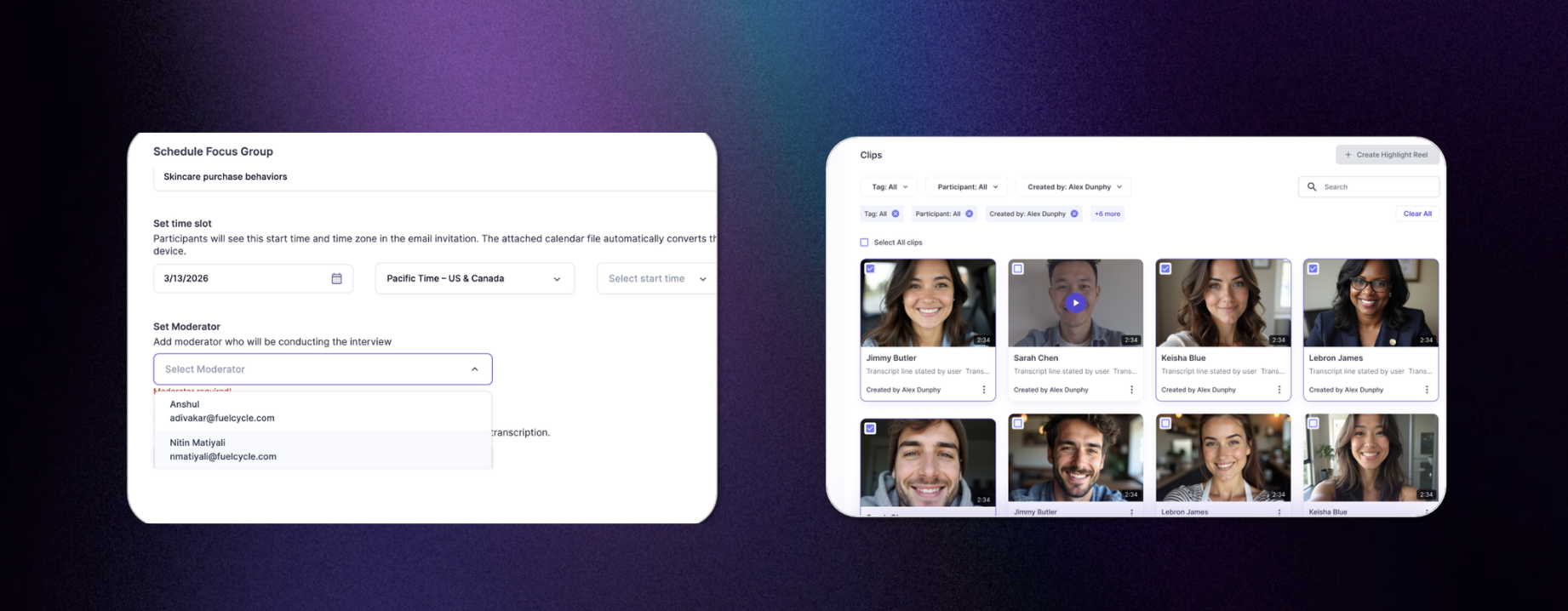
When a session is created, Scheduler automatically assigns the right calendar invite to each role — moderator, participant, and observer — with the correct join link and session details. Calendar files auto-convert to each participant’s local time zone. When session details change, instant notifications go to all relevant stakeholders without any additional action from the research team.
Key capabilities include:
- Session setup — name the session, select type (IDI or focus group), set date, time, and time zone
- Role-based invitations — moderators, participants, and observers each receive the appropriate calendar event and join link
- Automatic time zone conversion — calendar attachments display in each recipient’s local time
- Instant change notifications — any update to session details triggers automated alerts to all stakeholders
- Automated confirmation emails — participants receive session details, expectations, and their join link automatically
Who Benefits from Scheduler
Scheduler is useful for any team running moderated qual research — user interviews, concept tests, focus groups, or ongoing panel sessions.
It is particularly valuable for teams that:
- Run multiple sessions per week and lose time to coordination overhead
- Work with participants or observers in different time zones
- Need a reliable, repeatable setup process that does not depend on one person managing every detail
Highlight Reels: A Better Way to Share What You Found
The Problem: Insights That Go Unseen
Most enterprise research teams are not short on evidence. After a round of user interviews, there are recordings, transcripts, and synthesis documents that clearly show what customers think, where friction exists, and what the product team needs to do next.
The challenge is delivery. A 90-minute session recording is impractical for a VP reviewing findings between meetings. A folder of clips with no context is difficult to navigate. And a written summary, however well crafted, loses the credibility of hearing real customers in their own words.
Research quality is rarely the issue. Format is.
What Highlight Reels Does
Highlight Reels gives qualitative researchers a way to curate, sequence, and share the video moments that matter most. Instead of sending a full session recording, researchers can send a polished 4-minute playlist that tells a clear story and puts the voice of the customer directly in front of decision-makers.
The entire workflow — clipping, sequencing, annotating, and sharing — happens inside Fuel Cycle. No external video editing tools required.
Key capabilities include:
- Clip key moments directly from session recordings inside Fuel Cycle
- Arrange clips into a sequenced playlist with a defined narrative order
- Add context or annotations to individual clips
- Share via a single link with stakeholders who do not need a Fuel Cycle account
- Access all saved Highlight Reels from a centralized workspace library
How to Build a Highlight Reel
Step 1: Define your narrative. Before clipping, decide on the core point you want stakeholders to walk away with. A clear narrative prevents the reel from becoming a random collection of interesting moments.
Step 2: Review your recordings and mark moments. Watch session recordings in Fuel Cycle and add timestamped notes to flag the moments that support your narrative. Look for direct quotes, visible friction, and unprompted suggestions from participants.
Step 3: Create and trim your clips. For each flagged moment, create a clip and trim it to the essential content. Aim for 4 to 7 clips per reel.
Step 4: Sequence your clips. Drag clips into the Highlight Reel and arrange them in an order that builds your argument. Common structures include problem-to-evidence, comparison between options, or escalation from mild to significant friction.
Step 5: Add context and share. Add a brief annotation or intro to orient viewers, generate your shareable link, and send it directly to stakeholders.
A well-built Highlight Reel can be watched in under five minutes and communicates a finding that took days or weeks to uncover.
Who Benefits from Highlight Reels
Highlight Reels is built for qualitative researchers, consumer insights managers, and research operations teams who regularly conduct interviews and need to communicate findings to time-constrained audiences.
It is particularly useful for teams that:
- Present research to product leads, executives, or cross-functional stakeholders who cannot review raw recordings
- Work across multiple business units where findings need to travel quickly and clearly
- Run regular research programmes and need a reliable, repeatable format for insight delivery
Frequently Asked Questions
What does Scheduler do in Fuel Cycle? Scheduler automates the logistics of setting up moderated research sessions — IDIs and focus groups — inside Fuel Cycle. It handles role-based calendar invitations, time zone conversion, participant confirmation emails, and change notifications, so research teams can set up a session without external coordination tools.
Do I need a separate calendar tool to use Scheduler? No. Scheduler sends role-appropriate calendar invites and automated confirmation emails directly from Fuel Cycle. Each recipient receives a calendar file that auto-converts to their local time zone.
What is a Highlight Reel in Fuel Cycle? A Highlight Reel is a curated playlist of video clips selected from qualitative research sessions. Researchers build them inside Fuel Cycle by choosing key moments from recordings, arranging them in sequence, and sharing the result as a single link.
Do stakeholders need a Fuel Cycle account to watch a Highlight Reel? No. Highlight Reels can be shared with anyone via a link. Recipients do not need a Fuel Cycle login to view the content.
What video editing tools do I need to create a Highlight Reel? None. The full workflow — from clipping to sharing — is handled inside Fuel Cycle. There is no need to export footage or use third-party editing software.
How long should a Highlight Reel be? A reel of 4 to 7 clips, watchable in under 5 minutes, is typically the most effective format for stakeholder presentations. The goal is to communicate one clear finding, not to document everything that happened in a session.
Are both features available to all Fuel Cycle customers? Scheduler and Highlight Reels are both available now for Fuel Cycle qual customers. Contact your CSM for a guided walkthrough.
Get Started
Both features are available now. Log in to explore them, or if you’re not a Fuel Cycle customer yet, request a demo here!